Hello, I'm trying to install on a win10 machine following instructions on various threads, but always coming up with this issue.
inkcut.txt
crash.txt
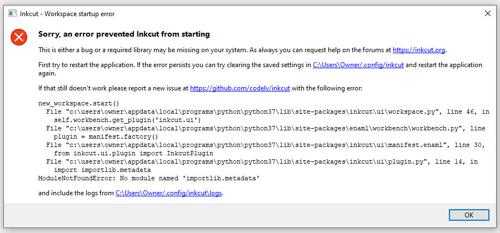
Can anyone help?
TIA

Hello, I'm trying to install on a win10 machine following instructions on various threads, but always coming up with this issue.
inkcut.txt
crash.txt
Can anyone help?
TIA

Assuming you have all the dependencies installed already.
Try editing inkcut_open.py
find the line:
cmd = ['inkcut']
Replace with(edit the path for your machine/install:
cmd = [r"C:\Users\username\AppData\Local\Microsoft\WindowsApps\python.exe", "-m", "inkcut"]